

Quick Summary
Calculating payroll requires a structured, step-by-step process to ensure accuracy and compliance.
- Start with employee data and gross pay
- Apply deductions, taxes, and employer obligations
- Finish and net pay and proper recordkeeping
Using a consistent system or payroll software helps reduce errors, save time, and ensure employees are paid correctly every cycle.
Introduction
Payroll processing is one of the most important responsibilities for small business owners. And it makes sense: paying employees accurately and on time keeps your workforce happy and ensures compliance with federal, state, and local tax laws.
But for many business owners, calculating payroll can feel overwhelming. There are tax withholdings, deductions, and compliance requirements to consider, as well as just finding the time to do so. Business owners often underestimate how long it takes to run payroll. Deloitte, for example, reports that a typical payroll employee works 25 hours of overtime per month to get the job done.
The good news? Once you understand the key components and follow a structured payroll process, it becomes much easier.
This guide will explain how to calculate payroll step by step so you can confidently manage employee paychecks and tax obligations.
TIP: Bookmark the links below so you’ll always have the calculators handy!
Step-by-Step Payroll Calculation Process
Calculating payroll isn’t as simple as issuing paychecks. Instead, it involves multiple steps like gathering employee information, calculating gross pay, withholding the correct taxes, and ensuring compliance with payroll tax laws.
Whether you have a single employee or a growing team, following a structured process helps prevent costly payroll errors.
Below, we break down the essential steps to run payroll accurately and efficiently for your small business.
1. Gather Employee Information
Before you calculate payroll, you need accurate and complete employee information. This step may seem simple, but it often takes more time than expected because it involves collecting, verifying, and maintaining multiple data points for each employee.
In fact, Deloitte has found that the single most time-consuming aspect of payroll processing is manually entering or loading payroll inputs.
To begin, new employees must complete the following forms before their payday:
- Form W-4: Determines how much federal income tax should be withheld.
- State W-4 (if applicable): Some states require a separate withholding form.
- Form I-9: Verifies employment eligibility and legal work status.
- Direct Deposit Authorization: Required if you’re paying employees via direct deposit.
You will also need to confirm key details such as pay rate, classification (hourly or salaried), benefit elections, and work location.
Where does the time go?
This step can take anywhere from a couple of hours to a full day or more, depending on your workforce size and processes. Time is often spent on:
- Following up on missing or incomplete forms
- Verifying employee eligibility and documentation
- Entering data into payroll systems
- Updating records after employee changes.
The variation comes down to scale and systems. A small business with five employees and digital onboarding may complete this quickly. A larger team using manual paperwork may spend hours tracking down errors or re-entering data.
Tips to improve efficiency without losing accuracy:
- Use digital onboarding tools to collect and store forms in one place
- Create a standardized checklist for new hires
- Review employee information at least once per year
- Encourage employees to update their W-4 after major life events
- Upgrade your payroll technology or vendor to automate manual data entry
Getting this step right is critical. Errors in employee information can affect every part of your payroll calculations, from tax withholdings to compliance reporting.
2. Determine Gross Pay
Gross pay is the starting point for all payroll calculations. It represents the total amount an employee earns before any deductions or taxes are applied. While the basic formulas are simple, this step is one of the most common sources of payroll errors, especially when handled manually.
How to calculate gross pay
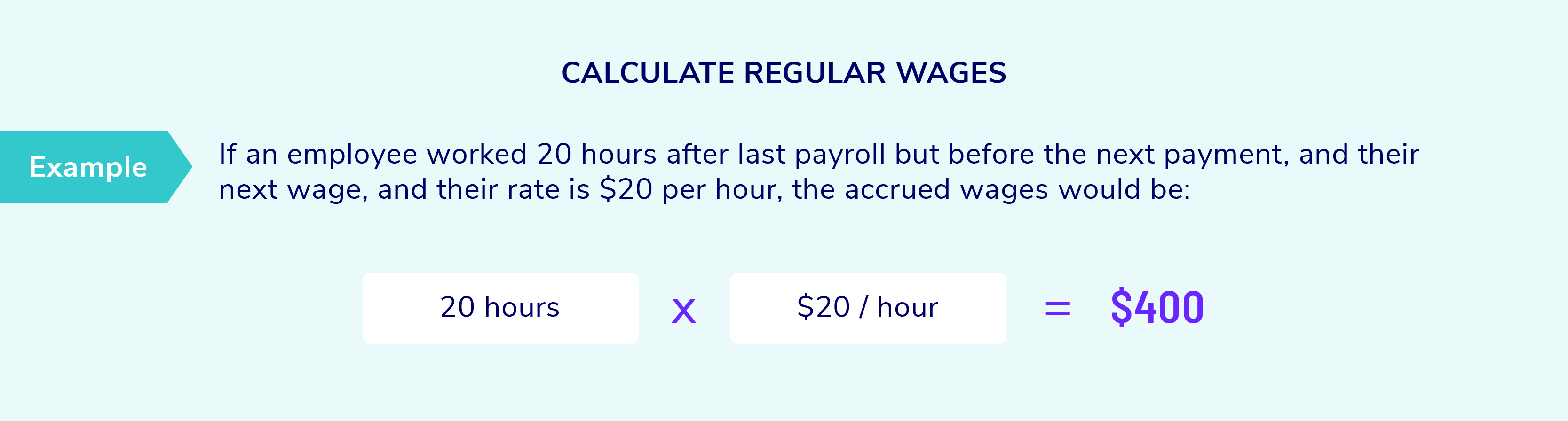
For hourly employees: Multiply total hours worked by their hourly rate. If the employee worked overtime, apply the correct overtime rate, which is typically 1.5 times the regular rate for hours over 40 in a workweek.

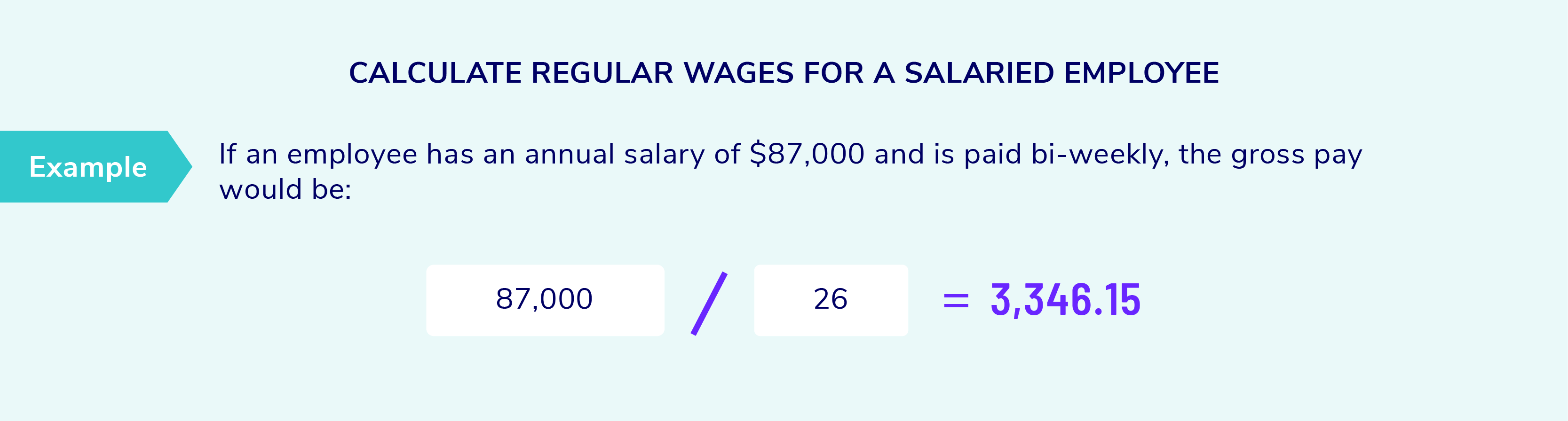
For salaried employees: Divide the employee’s annual salary by the number of pay periods in a year. For example, a $52,000 salary paid bi-weekly would result in $2,000 per pay period.
In addition to base pay, gross wages may also include:
- Bonuses and incentive pay
- Commissions
- Tips (for applicable roles)
- Shift differentials
- Paid time off, such as vacation or sick leave
Where does this calculation happen?
Gross pay can be calculated in several ways, depending on your payroll setup:
- Manual spreadsheets: Common for very small businesses, but prone to errors if formulas or inputs are incorrect
- Basic payroll tools: May handle simple calculations, but require manual inputs for hours and adjustments
- Modern payroll software: Automates calculations based on time tracking and pay rules
- Payroll providers: Handle the entire process, including validation and compliance checks
The more manual your process, the higher the risk of mistakes. Even small errors in hours worked or pay rates can lead to incorrect payroll calculations that carry through the rest of the payroll process. Every step that follows, including taxes and deductions, depends on this number. A strong proess here helps ensure your payroll calculations remain accurate from start to finish.
Tips to improve accuracy and consistency
- Use a reliable time tracking system to capute hours worked
- Double-check overtime calculations and pay rules
- Standardize how bonuses and commissions are entered
- Audit payroll reports regularly to catch discrepancies
- Avoid rekeying data across systems whenever possible
For more information:
3. Apply Pre-Tax Deductions
Once you’ve determined gross pay, the next step in payroll calculations is to apply pre-tax deductions. These are amounts taken out of an employee’s pay before certain taxes are calculated, which lowers taxable income and can reduce the employee’s overall tax burden.
Common pre-tax deductions include:
Pre-tax deductions are amounts taken from an employee’s paycheck before taxes are calculated. These deductions reduce taxable income, helping employees save on taxes while contributing to important benefits.
Common pre-tax deductions include:
- Health insurance premiums (medical, dental, vision)
- Retirement contributions such as 401(k), SIMPLE IRA retirement plans
- Health savings accounts (HSAs) and flexible spending accounts (FSAs)
Because these deductions reduce taxable wages, they directly affect how much federal income tax and sometimes FICA taxes, are withheld.
Why this step matters
Pre-tax deductions are a critical part of how you calculate payroll accurately. If applied incorrectly, they can lead to under- or over-withholding taxes, which may create compliance issues or require corrections later.
One important detail is that not all pre-deductions apply to all taxes. For example, some deductions reduce federal income tax but not Social Security or Medicare wages. This makes the order and classification of deductions especially important.
Where errors commonly occur
This step often becomes complex when handled manually or across disconnected systems. Common challenges include
- Misclassifying deductions as pre-tax when they are not
- Apply deductions in the wrong order
- Using outdated contribution limits
- Failing to stop deductions at annual limits
Tips to improve accuracy and efficiency
- Clearly define which deductions are pre-tax and which taxes they impact
- Keep up with annual IRS contribution limits for retirement and health accounts
- Use payroll software that automatically applies deduction rules
- Reconcile benefit deductions with enrollment records each pay cycle
Strategic consideration for employers
Offering pre-tax benefits can also strengthen your overall compensation strategy. Employees value benefits that reduce their taxable income while supporting long-term financial health. For example, if you’re not offering retirement plans in your benefits package, it may be worth reconsidering.
Two out of every three employees (65%) consider the availability of retirement-related benefits before they consider accepting a job offer. That makes them a powerful tool for retention and satisfaction.
For more information:
- IRS Publication 15-B (Fringe Benefits)
- IRS HSA guidance
- American Payroll Association
4. Calculate Tax Withholdings
After applying pre-tax deductions, the next step in payroll calculations is to determine how much tax to withhold from each employee’s paycheck. This is where payroll can become more complex, because the correct withholding depends on both employee-specific information and current tax rules.
How do you know what to withhold?
Tax withholdings are not one-size-fits-all. They are based on several factors, including:
- Information from the employee’s Form W-4 (filing status, dependents, extra withholding)
- The employee’s gross taxable wages after pre-tax deductions
- Federal, state, and local tax rates
- The employee’s work and residence location
In other words, two employees earning the same salary may have very different tax withholdings based on their personal elections.
Employee classification matters
Before calculating withholdings, it’s important to understand how the worker is classified:
- W-2 employees (full-time or part-time): Subject to income tax withholding and FICA taxes
- Independent contractors (1099): No taxes are withheld by the employer; they are responsible for their own taxes
- Exempt vs non-exempt employees: Affects overtime rules, but not whether taxes are withheld
Misclassifying workers is a common and costly mistake. If you treat a contractor like an employee, or vice versa, it can lead to penalties and back taxes.
Types of payroll taxes to withhold
- Federal income tax: Based on IRS withholding tables and W-4 data
- State and local income taxes: Rules vary widely by jurisdiction
- FICA taxes:
- Social Security: 6.2% (up to the annual wage base limit)
- Medicare: 1.45% (plus an additional 0.9% for high earners, withheld from employees only)
Tips to improve accuracy
- Use current IRS and state tax tables every year
- Validate W-4 data before running payroll
- Use payroll software that automatically calculates withholdings
- Double-check calculations for employees with unique tax situations
NOTE: Pre-tax deductions reduce taxable wages for certain taxes, which means withholdings must be calculated after those deductions are applied.
For more information:
- IRS Publication 15 (Employer’s Tax Guide)
- IRS withholding estimator
5. Apply Post-Tax Deductions
After taxes have been calculated and withheld, the next step in payroll calculations is to apply post-tax deductions. These are amounts taken out of an employee’s pay after taxes, meaning they do not reduce taxable income.
Common post-tax deductions include:
- Wage garnishments, such as child support or debt repayment
- Union dues
- Roth 401(k) contributions
- Certain voluntary benefits or insurance products
At first glance, this step may seem like a simple extension of tax withholdings. But it has its own set of rules and risks, especially when legal obligations are involved.
Why post-tax deductions require attention
Post-tax deductions often involve strict compliance requirements. For example, wage garnishments are governed by federal and state laws that dictate:
- How much can be withheld from an employee’s paycheck
- The priority order if multiple garnishments apply
- Required timelines for payment to agencies or courts
Failure to follow these rules can result in penalties for the employer, not just the employee.
How these deductions are applied
Mechanically, post-tax deductions are taken after all taxes have been calculated. However, the order still matters. A typical sequence looks like this:
- Calculate gross pay
- Subtract pre-tax deductions
- Withhold taxes
- Apply post-tax deductions
Within post-tax deductions, required deductions like garnishments should generally be applied before voluntary ones.
Tips to improve accuracy and compliance
- Carefully review garnishment orders and follow all instructions exactly
- Track deduction limits, especially for employees with multiple obligations
- Separate required and voluntary deductoins in your payroll system
- Use payroll software that automatically enforces deduction rules and limits
While this step may be smaller than others, don’t overlook it or underestimate its importance. Post-tax deductions often carry legal weight, and accuracy here helps protect both your employees and your business.
6. Calculate Net Pay
Net pay, or take-home pay, is the final amount an employee receives after all payroll calculations are complete. It is what gets deposited into their bank account or printed on their paycheck.
The formula itself is straightforward:

Gross pay – pre-tax deductions – taxes – post tax deductions = net pay
However, this step is about more than just applying a formula. It is where all prior payroll calculations come together, and where process quality matters most. Even small issues upstream can result in incorrect net pay, which can quickly lead to employee frustration and time-consuming corrections.
Where and how net pay is calcualted
Net pay is typically calculated in one of three ways:
- Manual spreadsheets: Flexible but prone to errors such as incorrect formulas, broken cell references, or outdated data.
- Semi-automated systems: Combine manual inputs with some automation, but still require careful oversight.
- Fully automated systems: Calculate net pay automatically based on configured rules, deductions, and tax tables.
The risk of error increases in manual or semi-manual processes. A single incorrect formula or missed update can affect multiple employees at once.
Best practices to ensure accuracy
- Standardize your payroll calculation process across all employees
- Limit manual data entry wherever possible
- Use locked formulas or templates to prevent accidental changes
- Run a payroll preview or audit report before finalizing pay
- Reconcile totals, such as gross wages and total deductions, each cycle
Why this step matters
Net pay is the most visible part of payroll to employees. If it is wrong, employee trust can erode quickly, even if the error is small. Repeat mistakes would lead a majority of employees to consider leaving their job. Accurate payroll processing ensures employees are paid correctly and on time, while also supporting compliance with tax and reporting requirements.
For more information:
7. Account for Employer Taxes
Beyond employee withholdings, employers have their own payroll tax responsibilities. These employer taxes are a critical part of total payroll costs and must be calculated and tracked alongside employee pay.
Key employer taxes include:
- FICA taxes: Employers must match employee contributions, including 6.2% for Social Security and 1.45% for Medicare.
- FUTA (Federal Unemployment Tax): Typically 6% on the first $7,000 of wages per employee, though credits may reduce the effective rate
- SUTA (State Unemployment Tax): Rates and wages bases vary by state and employer history
- State-specific employer liabilities such as paid family and medical leave (PFML) or disability insurance in certain states
Where employer taxes fit in payroll calculations
Employer taxes are not deducted from employee pay. Instead, they are calculated in parallel based on employee wages and tracked as a separate liability. This means your payroll process must do two things at once:
- Calculate accurate employee net pay
- Accrue and track employer tax obligations for reporting and payment
Why employer taxes can be complex
Employer taxes may seem straightforward at first, but several factors can add complexity:
- Wage limits, such as the Social Security wage base
- Variable SUTA rates based on your company’s experience rating
- FUTA credit reductions in certain states
- Different rules for multi-state employees
Because these taxes are tied to employee earnings, errors in earlier payroll calculations can also affect employer tax totals.
Best practices for accuracy and compliance
- Track employer taxes as separate line item in your payroll system
- Monitor wage limits and reset calculations when thresholds are reached
- Review state tax notices annually for updated rates
- Reconcile payroll tax liabilities before making deposits
Compliance reminder
Employer taxes must be deposited and reported on a defined schedule, often monthly or semiweekly depending on your payroll size. Missing deadlines can trigger penalties quickly. Failure to calculate and pay employer taxes correctly can result in IRS penalties and fines. That makes this step essential to a compliant payroll process.
8. Issue Paychecks
Once payroll calculations are complete, the final step is to pay employees accurately and on time. While this may seem straightforward, the way you issue pay can have a direct impact on accuracy, compliance, and employee satisfaction.
Businesses typically issue pay through:
- Direct deposit: The most efficient and secure option (and most common, with 88% of W2 employees using direct deposit), funds are transferred electronically to employee bank accounts
- Paper checks: Sometimes necessary for employees without bank accounts, but more time-consuming to manage
- Payroll cards: Reloadable cards that provide an alternative to traditional banking
Best practices for smooth payroll distribution
- Establish a clear payroll schedule with built-in processing time
- Validate employee banking information regularly
- Run a final payroll audit before submitting payments
- Use payroll systems that generate and transmit direct deposit files automatically
- Provide employees with digital pay stubs for transparency
Why paying your employees matter
Even if all prior payroll calculations are correct, delays or errors in payment can damange employee trust. Timely and accurate pay is one of the most visible measures of operational reliability.
TIP: Offering direct deposit and on-demand pay can improve retention and employee satisfaction. Direct deposit is now widely expected, with most employees using it, and on-demand pay options are increasingly valued for financial flexibility. Even the IRS is phasing out paper checks. to retain employees.
Payroll Recordkeeping and Compliance
Payroll doesn’t stop once paychecks are issued. Businesses must maintain accurate payroll records to comply with federal and state laws and be prepared for tax audits. Proper record keeping also ensures transparency in case of employee disputes.
Maintain Accurate Records
Federal law requires employers to keep payroll records for at least three years, while tax-related records should be stored for up to seven years.
Key payroll documents include:
- Employee tax forms (W-4, I-9)
- Payroll registers and pay stubs
- Tax filings and deposit records
Compliance with Filing Requirements
Employers must meet federal, state, and local payroll tax filing deadlines to avoid penalties. Common payroll filings include:
- Quarterly tax reports (IRS Form 941 for federal withholdings)
- Annual employee tax forms (W-2 for employees, W-3 for the IRS)
- State unemployment filings
Using payroll software or a payroll provider can help ensure all filings are submitted on time and error-free.
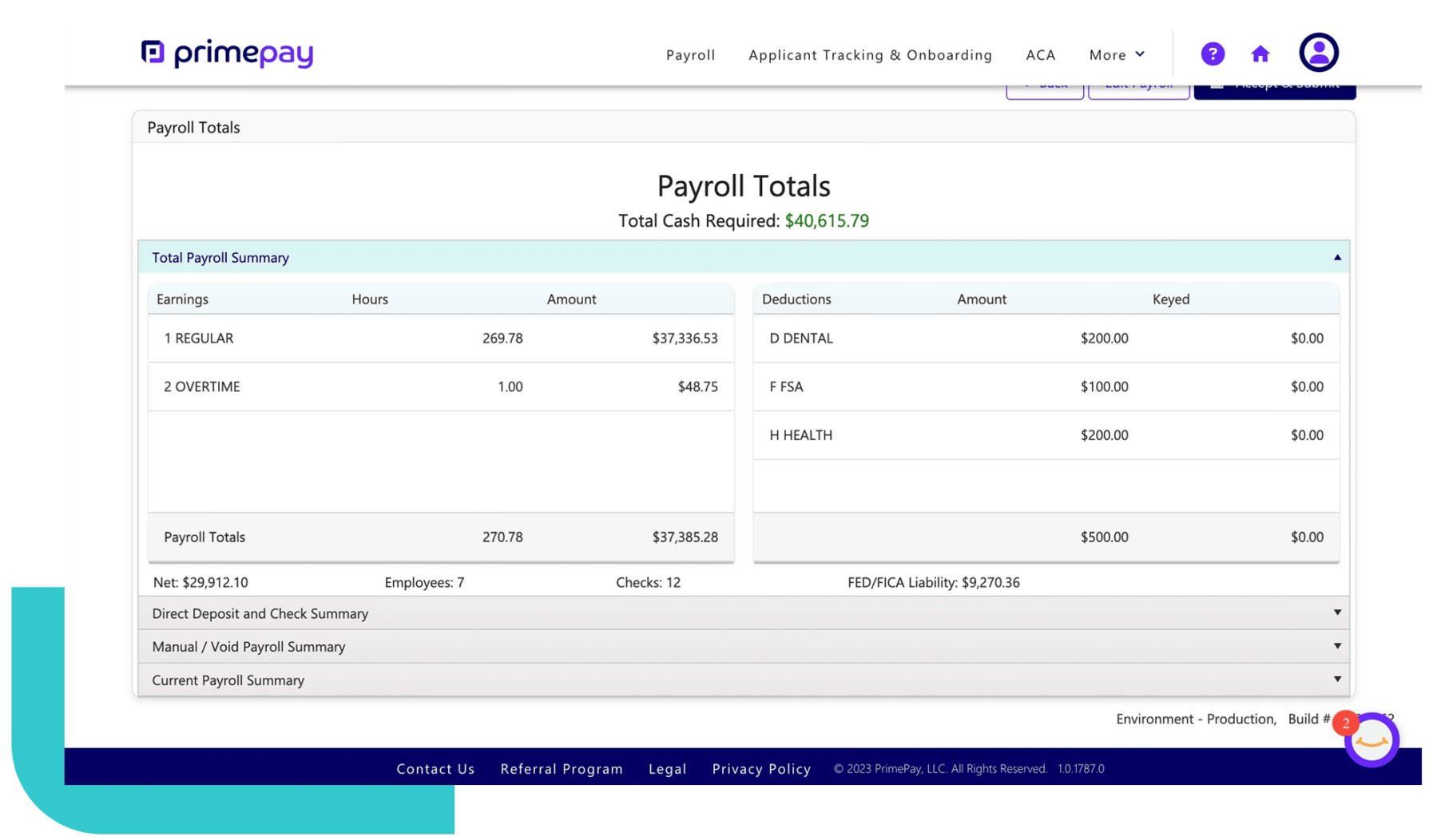
Payroll processing is essential to running a business, and accuracy is key to staying compliant and keeping employees happy. By following these step-by-step payroll calculation guidelines, you can confidently manage payroll while minimizing errors.
If payroll feels like a time-consuming burden, PrimePay’s payroll solutions can simplify the process by handling payroll calculations, tax filings, and compliance for you. PrimePay takes a potentially cumbersome process and transform it into a painless experience that you and your staff re-focus on strategic, growth-oriented priorities rather than administrative requirements.

Laura Davis is the Sr. Director of Business Support at PrimePay. She brings over 15 years of expertise in the payroll industry, leading a national payroll team through evolving compliance landscapes. Passionate about technology and innovation, Laura thrives on discovering ways to enhance client experiences and make payroll seamless and stress-free.
More from this Author